This article quickly walks you through the process of setting up an absolutely minimal mobile- and desktop-friendly web application using the Django framework. This particular framework works very well with mobile thanks to the way its templates are structured and makes for a good choice for new web-based applications. This article assumes that you have python 2.3 or later and SVN already installed and working.
First we need to download the latest Django:
  ~$ wget http://www.djangoproject.com/download/1.0.2/tarball/

  ~$ tar xzvf Django-1.0.2-final.tar.gz

  ~$ cd Django-1.0.2-final

  ~$ sudo python setup.py install
Install sqlite (often not included in Linux distributions):
~$ sudo apt-get install python-sqlite
Create a new project:
~$ django-admin.py startproject mobapp
(django-admin.py should now be in path). This should give you a directory structure like the following:
mobapp/

  __init__.py

  manage.py

  settings.py

  urls.py
Edit settings.py to use sqlite, and pick a db name
  DATABASE_ENGINE = 'sqlite3'
  DATABASE_NAME = 'mobapp'
Sqlite is probably the easiest way to get started but if you want to use MySQL instead it requires just the addition of the DB name and authentication credentials to work. Now you need to write the relevant initial data into the DB (this is the data the Django uses for the Administration interface):
  ~$ cd mobapp

  ~/mobapp$ ./manage.py syncdb
You will be asked if you want to create a superuser. This is recommended (to get all the cool Django DB admin stuff). Right now the application is ready to run, but does absolutely nothing. Remedy this by typing the following:
~/mobapp$ ./manage.py startapp pub
This command creates a new "app" within the project. This should create a new directory called pub with some files in it, something like this:
pub/

  __init__.py

  models.py

  views.py
Now open up the settings.py and edit it to make it aware of the new app:
INSTALLED_APPS = (
  'django.contrib.auth',
  'django.contrib.contenttypes',
  'django.contrib.sessions',
  'django.contrib.sites',
  'mobapp.pub'
  )
Now to develop the actual app. For the sake of simplicity we’ll leave the models.py alone for now — this application will not use any database functionality.
Edit pub/views.py — this is where the guts of the code will reside. Paste in the following code:
views.py
# Some standard Django stuff
from django.http import HttpResponse, HttpResponseRedirect, Http404
from django.template import Context, loader

# list of mobile User Agents
mobile_uas = [
	'w3c ','acs-','alav','alca','amoi','audi','avan','benq','bird','blac',
	'blaz','brew','cell','cldc','cmd-','dang','doco','eric','hipt','inno',
	'ipaq','java','jigs','kddi','keji','leno','lg-c','lg-d','lg-g','lge-',
	'maui','maxo','midp','mits','mmef','mobi','mot-','moto','mwbp','nec-',
	'newt','noki','oper','palm','pana','pant','phil','play','port','prox',
	'qwap','sage','sams','sany','sch-','sec-','send','seri','sgh-','shar',
	'sie-','siem','smal','smar','sony','sph-','symb','t-mo','teli','tim-',
	'tosh','tsm-','upg1','upsi','vk-v','voda','wap-','wapa','wapi','wapp',
	'wapr','webc','winw','winw','xda','xda-'
	]

mobile_ua_hints = [ 'SymbianOS', 'Opera Mini', 'iPhone' ]


def mobileBrowser(request):
    ''' Super simple device detection, returns True for mobile devices '''

    mobile_browser = False
    ua = request.META['HTTP_USER_AGENT'].lower()[0:4]

    if (ua in mobile_uas):
        mobile_browser = True
    else:
        for hint in mobile_ua_hints:
            if request.META['HTTP_USER_AGENT'].find(hint) > 0:
                mobile_browser = True

    return mobile_browser


def index(request):
    '''Render the index page'''

    if mobileBrowser(request):
        t = loader.get_template('m_index.html')
    else:
        t = loader.get_template('index.html')

    c = Context( { }) # normally your page data would go here

    return HttpResponse(t.render(c))
This code requires 2 templates, one for mobile users, the other for desktop users. We need to create these templates and put them in a directory that Django knows about.
~/mobapp$ mkdir pub/templates
Create two new files in this directory, called m_index.html and index.html. You can put the following content in these files:
index.html
<!DOCTYPE html PUBLIC "-//W3C//DTD XHTML 1.0 Transitional//EN"
"http://www.w3.org/TR/xhtml1/DTD/xhtml1-transitional.dtd">
<html>
    <head>
        <title>mobapp (sedentary)<title>
    </head>
    <body>
        <h1>Hello, sedentary user</h1>
    </body>
</html>
m_index.html
<?xml version='1.0' encoding='UTF-8'?>
<!DOCTYPE html PUBLIC '-//WAPFORUM//DTD XHTML Mobile 1.0//EN'
'http://www.wapforum.org/DTD/xhtml-mobile10.dtd'>
  <html xmlns='http://www.w3.org/1999/xhtml'>
    <head>
        <title>mobapp (mobile)</title>
    </head>
    <body>
	<h1>Hello, mobile user</h1>
    </body>
  </html>
Now we need to let Django know where the templates for the project are. Open settings.py and add a line pointing to the relevant directory e.g.
TEMPLATE_DIRS = (
  # Put strings here, like "/home/html/django_templates"
  # Always use forward slashes, even on Windows.
  # Don't forget to use absolute paths, not relative paths.
  '/home/ronan/mobapp/pub/templates'
  )
Now that our index method is ready in views.py, we need to point a URL at it. Add the following line to urls.py
(r'^$', 'mobapp.pub.views.index'),
This pattern tells Django to point any blank URL at the index method in views.py e.g.
urls.py
  urlpatterns = patterns('',
  # Example:<br />
  # (r'^mobapp/', include('mobapp.foo.urls')),
  # Uncomment the admin/doc line below and add 'django.contrib.admindocs'
  # to INSTALLED_APPS to enable admin documentation:
  # (r'^admin/doc/', include('django.contrib.admindocs.urls')),
  # Uncomment the next line to enable the admin:
  # (r'^admin/(.*)', admin.site.root),
 (r'^$', 'mobapp.pub.views.index'),
  )
And that’s it. Now if you start the server you have a minimal mobile- and desktop-friendly app:
~/mobapp$ ./manage.py runserver

  Validating models...

  0 errors found

  Django version 1.0.2 final, using settings 'mobapp.settings'

  Development server is running at http://127.0.0.1:8000/

  Quit the server with CONTROL-C.
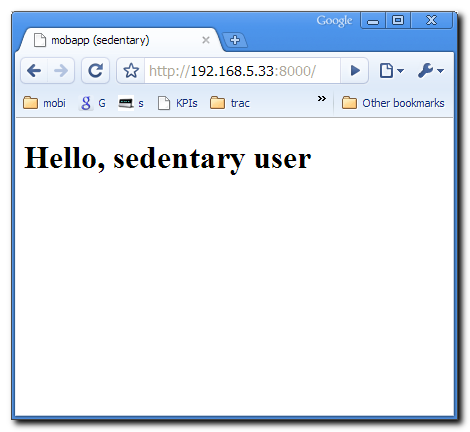
If you now go to http://localhost:8000/ with your browser you should see the following page:
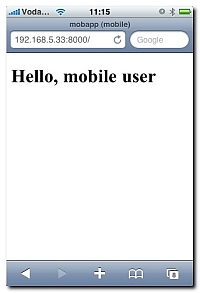
Visit the same URL with a mobile device and you will see something like this:
Discussion
This is an absolutely minimal Django application with a very modest feature set. Its main purpose is to demonstrate an approach to building a Django application that can simultaneously serve mobile and desktop users rather than show off any of Django’s great features. Please note that the device detection method used in this article is very basic, and really serves only as a way to differentiate mobile from desktop users rather than as a way to fine-tune the experience to the end device. To build a really consumer-friendly application you should use a more sophisticated device detection technology such as DeviceAtlas, which works fine with Django. Note that the device detection code used in this example is modelled on Andy Moore‘s PHP code.
This code for this application can be downloaded from the link below (mobapp.zip).